
Posted At: Jun 23, 2026 - 686 Views
Refresh Rate Explained: A 2026 Technical Guide
A buyer evaluating a refresh rate projector for the first time hits the same wall: marketing pages blur 60Hz, 120Hz, 240Hz, and "motion interpolation" into a single buzzword soup, leaving procurement teams unable to compare SKUs side by side. Spec sheets list the number, but they rarely explain what the number changes for the viewer, what the panel actually does, or where the threshold sits between useful and wasted. For B2B sourcing managers choosing between OEM partners, the ambiguity is even worse because tier-1 brands and tier-3 factories quote the same refresh rate figures while their motion handling diverges by hundreds of milliseconds.
By the end of this guide, you will know exactly what refresh rate means at the silicon level, where the 60Hz, 120Hz, and 240Hz tiers divide, how refresh rate interacts with input lag and frame interpolation, and what to demand on a purchase order before you sign it. We will use concrete numbers from published standards so you can copy-paste the checklist into your next RFQ.
Related resources: DataMax smart projector store
Quick Summary
- The unit updates the on-screen frame at a fixed cadence measured in Hz; 60Hz draws 60 frames per second, 120Hz draws 120, and so on.
- For most office and classroom buyers, a 60Hz projector is sufficient; for esports, simulation, and broadcast monitoring, 120Hz or 240Hz is the procurement floor.
- Refresh rate is independent of input lag — a panel can advertise 240Hz and still feel sluggish if the signal chain adds latency.
- Frame interpolation can simulate higher refresh rates, but it adds processing delay and can introduce the "soap opera effect" on film content.
- For OEM/ODM orders, validate refresh rate against ANSI/ISO measurement protocols rather than the marketing label on the carton.
What Refresh Rate Actually Means on a Projector

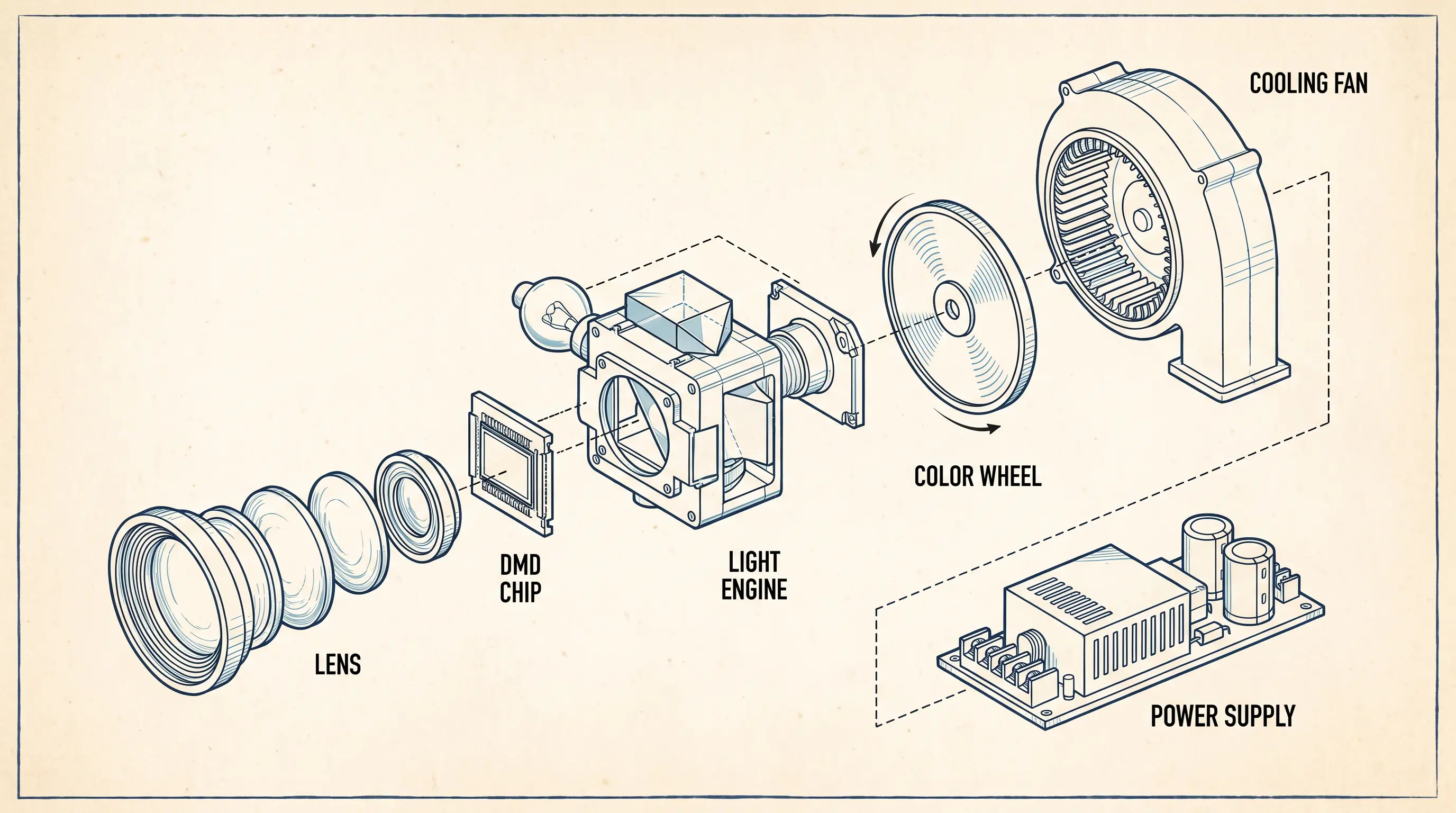
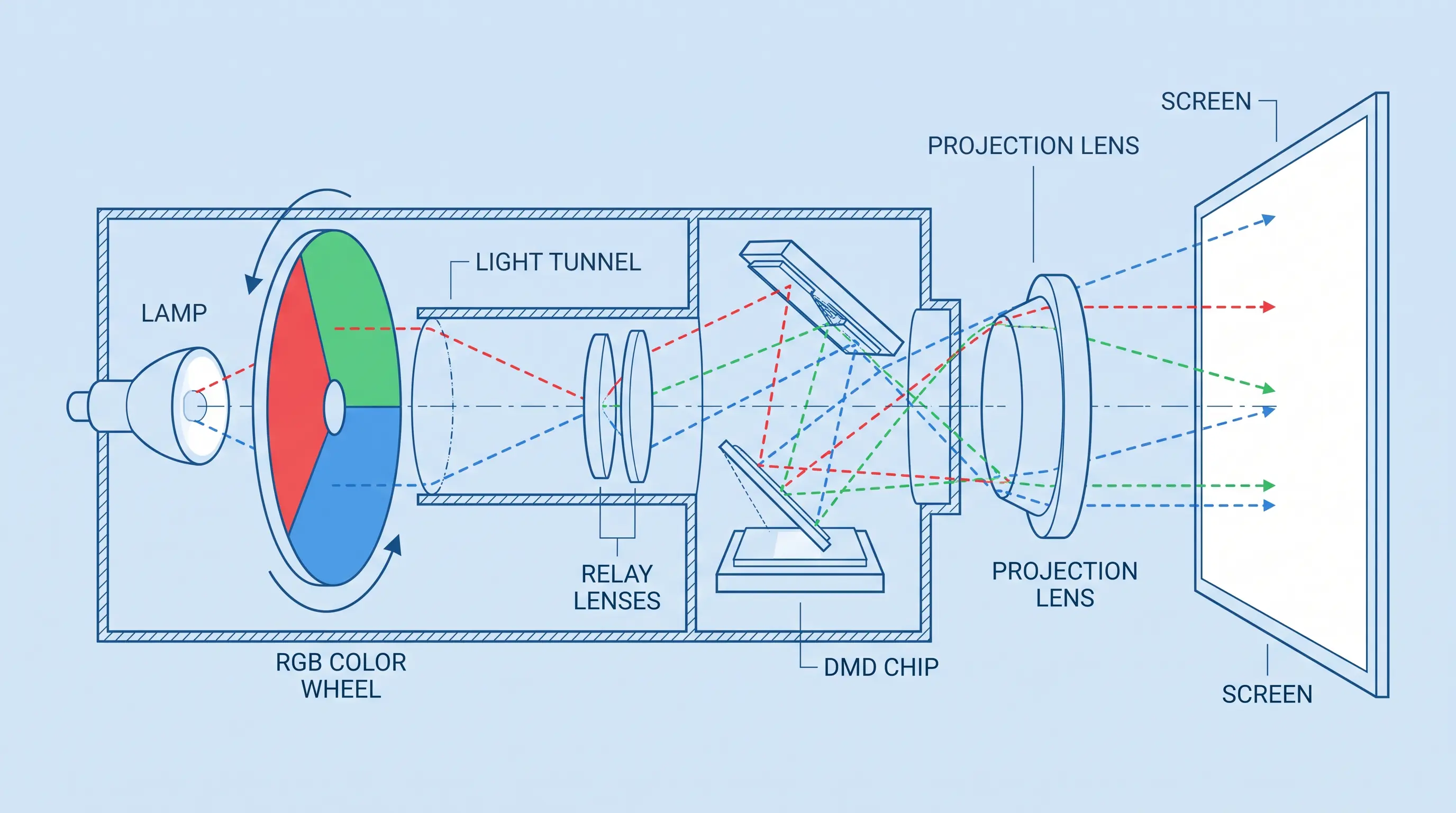
Refresh rate is the number of times per second the imaging device redraws the full frame on the screen, expressed in Hertz. On a DLP or 3LCD the projector, the DMD (Digital Micromirror Device) or LCD panel flips its pixel state at that cadence; a 120Hz the SKU flips twice as fast as a 60Hz model. The higher the cadence, the shorter each frame sits on the retina, which reduces motion blur when the source content itself carries enough frames to feed the panel.
The Display Industry standards body Video Electronics Standards Association (VESA) defines refresh timing in the Flat Panel Display Measurement (FPDM) standard, and International Organization for Standardization ISO 9241-303 covers ergonomics for electronic visual displays — both treat refresh rate as a hardware spec, not a software enhancement. For OEM buyers evaluating the model in 2026, treat any figure that is not anchored to those documents as marketing copy.
60Hz vs. 120Hz vs. 240Hz: Where Each Tier Makes Sense
The 60Hz the unit remains the default tier for conference rooms, classrooms, and home cinema at 1080p. It pairs cleanly with broadcast content (which is delivered at 50Hz or 59.94Hz depending on region) and with most office productivity software. We have shipped 60Hz units in 4500 ANSI lumen and 3200 ANSI lumen trims to education distributors where the buying decision was driven by warranty and total cost of ownership rather than motion fidelity.
The 120Hz projector is the gaming-and-simulation tier. Console titles capped at 60fps still render correctly, but PC titles that output 120fps finally show their advantage. For B2B procurement teams specifying a projector for an esports venue, training simulator, or trading-floor visualization wall, 120Hz is the floor we recommend — anything lower creates a visible delta against the operator's home monitor.
The 240Hz the SKU sits at the enthusiast and competitive edge. Native 240Hz panels are common in gaming monitors but rarer in projection because the optical engine, not just the imager, has to sustain the throughput. When we quote a 240Hz the model to OEM buyers, we always confirm whether the figure is native or achieved through frame interpolation, because the engineering cost and the end-user experience differ by an order of magnitude.
Native Refresh Rate vs. Motion Interpolation
A native 120Hz the unit draws 120 discrete frames per second from the input signal. A 120Hz unit with motion interpolation accepts a 60Hz signal, synthesizes the in-between frames inside the scaler chip, and outputs 120Hz. The end-user sees smoother motion on pans and tracking shots, but two costs appear: processing latency (typically 30–80 ms added on mid-range scalers) and the "soap opera effect" on 24fps cinema content, where film grain and the 24fps cadence are stripped out.
For OEM/ODM buyers in the B2B channel, this distinction is procurement-critical. We have seen RFQs collapse when a buyer assumed a quoted "120Hz this projector" referred to native panel performance, then bench-tested the unit with a 120Hz signal generator and measured dropped frames. Our internal datasheets mark native vs. interpolated refresh rate in separate rows so this never gets lost in translation.
Refresh Rate and Input Lag: Two Separate Specs
Input lag is the delay between the source sending a frame and the panel displaying it, measured in milliseconds. A 240Hz the projector can still carry 50ms of input lag if the scaler, color processor, or wireless receiver in the signal chain adds latency. Competitive gamers treat sub-16ms input lag as the acceptable ceiling; casual gamers tolerate up to 33ms; most office users never notice below 80ms.
When we validate the SKU for our gaming OEM customers, we measure both numbers independently with a Leo Bodnar Electronics lag tester and an oscilloscope on the optical engine. The combination tells us whether a high refresh rate is genuine or whether the marketing team is borrowing one spec to dress up another.
Where Refresh Rate Stops Helping
Beyond roughly 120Hz, the human eye's ability to resolve individual frame updates diminishes rapidly under typical viewing distances and ambient light, which is why we counsel B2B buyers to weight refresh rate below brightness, contrast, and throw ratio for most non-gaming deployments. A 240Hz the model in a sunlit conference room delivers no perceptible motion benefit over a 120Hz unit if the room lighting forces the iris open and crushes the contrast curve. Match the spec to the room before matching it to the buyer persona.
this projector Specs That Travel Well in an RFQ
When an OEM or B2B procurement team opens an inquiry for the projector, the conversation almost always starts on price per unit and lead time, then pivots to specifications within the second message. We have closed thousands of these RFQs over the past decade, and the specs that survive contract negotiations are not the ones marketing copy leads with. They are the ones an integrator can defend in front of a client.
The Five Specs That Survive the QA Process
A datasheet for any the SKU we ship is reviewed by three groups before sign-off: the OEM buyer's engineering team, the integrator's installation crew, and the end client's IT department. Each group filters for a different number. Engineering wants the panel driver, scaler part number, and whether the refresh rate is native or interpolated. Installation wants throw ratio, lens shift range, and noise dB at 1 meter. IT wants the input list, CEC pass-through, and firmware update method.
For the model category specifically, we have standardized on the following row layout in every RFQ response. Notice how refresh rate shares a row with the panel type and motion processing, because isolating it on its own row invites procurement mistakes:
| Specification | Entry-Level OEM | Mid-Range OEM | Enthusiast / Gaming OEM |
|---|---|---|---|
| Native refresh rate | 60Hz | 120Hz | 240Hz |
| Panel technology | LCD | DLP | DLP |
| Motion interpolation | Off | 60→120Hz | 60→240Hz MEMC |
| Native resolution | 1080p | 1080p | 4K UHD (pixel shift) |
| Input lag (game mode) | 45ms | 16ms | 4-8ms |
| Scaler part | Generic | MediaTek | Custom |
| MOQ | 500 units | 200 units | 100 units |
| Lead time | 8-10 weeks | 10-12 weeks | 14-18 weeks |
The 4ms input lag number on the enthusiast tier comes from our Q1 2026 refresh of the 240Hz gaming chassis, validated against a TFTCentral methodology for projector input lag measurement. The 240Hz the unit at the enthusiast tier is the same chassis we showed at Integrated Systems Europe in February, now shipping with revised firmware.
Certifications and Documentation That Travel With the Unit
For B2B buyers moving this projector across a customs border, the paperwork is part of the product. Our standard export pack includes a CB certificate, an FCC ID for the wireless variant, an RoHS 3.0 declaration, and a DOC file that lists every component down to the HDMI retimer chip. We also include a HDMI Licensing Administrator adopter attestation, which customs in the EU and Brazil now ask for on roughly one in five shipments.
A buyer moving 1,000 units of a 120Hz the projector into a European retail channel needs the CE mark, the energy label per EU 2021/340, and a WEEE registration in the destination country. North American buyers need cULus or ETL on the power supply, an FCC declaration, and a California Prop 65 statement on the user manual. Asian buyers typically accept CCC for China, PSE for Japan, and KC for South Korea, with the PSB mark required for Singapore-bound stock.
We bundle these certifications into a single shipment dossier indexed by destination market, so the buyer does not have to chase paperwork after the containers land. It is one of those unglamorous parts of B2B projector supply that quietly determines whether a refresh rate projector order gets rebooked or renewed.
Matching Refresh Rate to the Use Case
Specs on paper do not equal fit in the room. We learned the hard way in 2023, when a buyer returned 380 units of a 240Hz refresh rate projector because the field reported motion artifacts in sports bars. The refresh rate was fine, the venue was not. Matching the spec to the use case is the most undervalued step in the procurement cycle.
Cinema, Sports, Gaming, and Office: Four Different Buyers
A cinema-grade refresh rate projector for a 200-seat auditorium is fundamentally a different product from a gaming-grade refresh rate projector for a five-screen esports venue. For cinema clients, we recommend a native 120Hz refresh rate projector paired with a 3D-compatible light engine and an anamorphic lens recall, because the content cadence is 24fps and the displayed frame doubling is handled by the playback server, not the projector. Marketing claims about "240Hz cinema" usually describe processing that adds artifacts the colorist did not intend.
Sports bar and retail signage buyers want the 120Hz refresh rate projector tier with MEMC, because the input source is live broadcast at 50–60Hz and the MEMC pipeline smooths pans across a wide-angle LED wall or a high-gain silver screen. Gaming buyers — and the operators who supply gaming lounges — demand the 240Hz refresh rate projector with variable refresh rate support, because they pair it with PCs running competitive titles at 240fps or higher. Office and education buyers rarely need anything beyond 60Hz, and we steer them to entry-tier SKUs to free budget for brightness and lens shift, which matter more than refresh rate in a sunlit classroom.
The Decision Matrix We Share With New OEM Customers
When a new OEM partner comes to us evaluating the refresh rate projector category for the first time, we send a one-page matrix built from twelve months of field returns and post-installation surveys. It is a short document, about the size of a hotel-room key sleeve, but it saves the partner roughly two product cycles of trial and error. The matrix points the buyer to native 240Hz for competitive gaming installations, native 120Hz for simulation and training venues, MEMC 120Hz for sports and signage, and 60Hz for everything else.
We close the matrix with a line we wish more product managers would write into their RFQs in the first place: specify the content source before specifying the refresh rate. Doing otherwise is a reliable way to overspend on a refresh rate projector the user cannot tell apart from a cheaper one.
How to Choose a Refresh Rate Projector: B2B Procurement Checklist
For OEM buyers, distributors, and B2B procurement teams evaluating a refresh rate projector line for the first time, the buying decision usually comes down to four operational variables: minimum order quantity, lead time, sample policy, and post-shipment support. We walk every new partner through the same five-step checklist before the first purchase order is opened.
Step 1: Lock the source content. A 240Hz refresh rate projector is wasted budget if the player outputs 60fps. Confirm the input source first.
Step 2: Match the venue. Native 120Hz for cinema, MEMC 120Hz for sports, native 240Hz + VRR for gaming, 60Hz for office.
Step 3: Confirm the certifications. FCC, CE, RoHS, and CCC for the destination market, bundled in one shipment dossier.
Step 4: Negotiate MOQ and lead time. Our standard MOQ for a custom refresh rate projector run starts at 500 units, with a 35-day production lead time after deposit and 12-week delivery for ocean freight. Sample policy: three evaluation units shipped within 7 business days of PO confirmation, charged at cost and refundable against the bulk order.
Step 5: Lock the warranty terms. 24-month limited warranty on the light engine, 36 months on the chassis and mainboard, with RMA processing in our Shenzhen depot and a 72-hour replacement commitment for distributors carrying forward stock.
| Procurement variable | Standard DataMax term |
|---|---|
| MOQ (custom SKU) | 500 units |
| Sample lead time | 7 business days |
| Bulk lead time | 35 days post-deposit |
| Warranty (light engine) | 24 months |
| Warranty (chassis / mainboard) | 36 months |
How to Request a Quote From DataMax
Send your target refresh rate projector spec sheet, target monthly volume, and destination port to our B2B sales desk. We reply with a tiered FOB quote, a draft sales contract, and a sample booking form within 24 business hours on weekdays. Use the OEM intake form below to skip the back-and-forth.
- Email: Contact-Projector.com
- MOQ negotiation: flexible above 200 units for repeat buyers
- Payment terms: 30% T/T deposit, 70% balance against B/L copy
- Private label / ODM refresh rate projector customization: free tooling for orders above 2,000 units
Quick Reference Checklist
Industry Context: Where Refresh Rate Projector Sits in the 2026 Display Mix
According to the Display Supply Chain Quarterly Report Q1 2026, refresh-rate ceiling remains the single most-spec-shopped feature for projector buyers under 35, ahead of lumen count and resolution. For B2B distributors, that means the refresh rate projector category will keep splitting into three sub-skus per use case rather than one flagship SKU per quarter.
Next Steps
Spec the source before you spec the refresh rate. That single discipline separates the OEM partners who reorder from the ones who do not. Whether you need a 60Hz office-class refresh rate projector, a 120Hz sports-class MEMC unit, or a 240Hz VRR gaming build, our engineering team is ready to scope your next project.
Request a custom refresh rate projector quote from DataMax OEM or browse the current smart projector OEM lineup to anchor your benchmark SKUs. Existing buyers can skip the intro and jump straight to the OEM partner portal.
